What makes a video long-form
A long-form AI video generator produces videos that typically run 10 minutes or longer in any form, including documentaries, educational series, explainers, and narrative shorts. No AI video model today is capable of generating one continuous clip that long in a single pass. Instead, a long-form video is built the same way a multi-shot AI video generator builds a short shot sequence: it takes many individual generations stitched together, just at a much larger scale. For instance, a 10-minute video might run up to 60 to 100 individual shots all strung together, rather than one long generation. That style of generation is the standard across every tool in this space right now, not a limitation specific to any one platform.
The scale of these videos makes a big difference. Even for shorter sequenced videos, there are a number of techniques that can make a shot sequence feel disconnected. Character drift, environment drift, inconsistent camera language, weak transitions between cuts and other challenges are covered in more depth in the multi-shot AI video guide. These problems also apply when creating a true long-form video, and they can compound across dozens more shots. There are also a handful of continuity issues beyond these that only show up once a production stretches past a short sequence.
Planning before generating
Before generating any long-form video, you need a script or a structured outline broken into individual scenes with what's on screen, the approximate duration of each clip and the narration or dialogue for each one. If you skip this step and generate shot by shot without a plan, a long-form video can end up feeling like a collection of unrelated clips rather than one cohesive video.
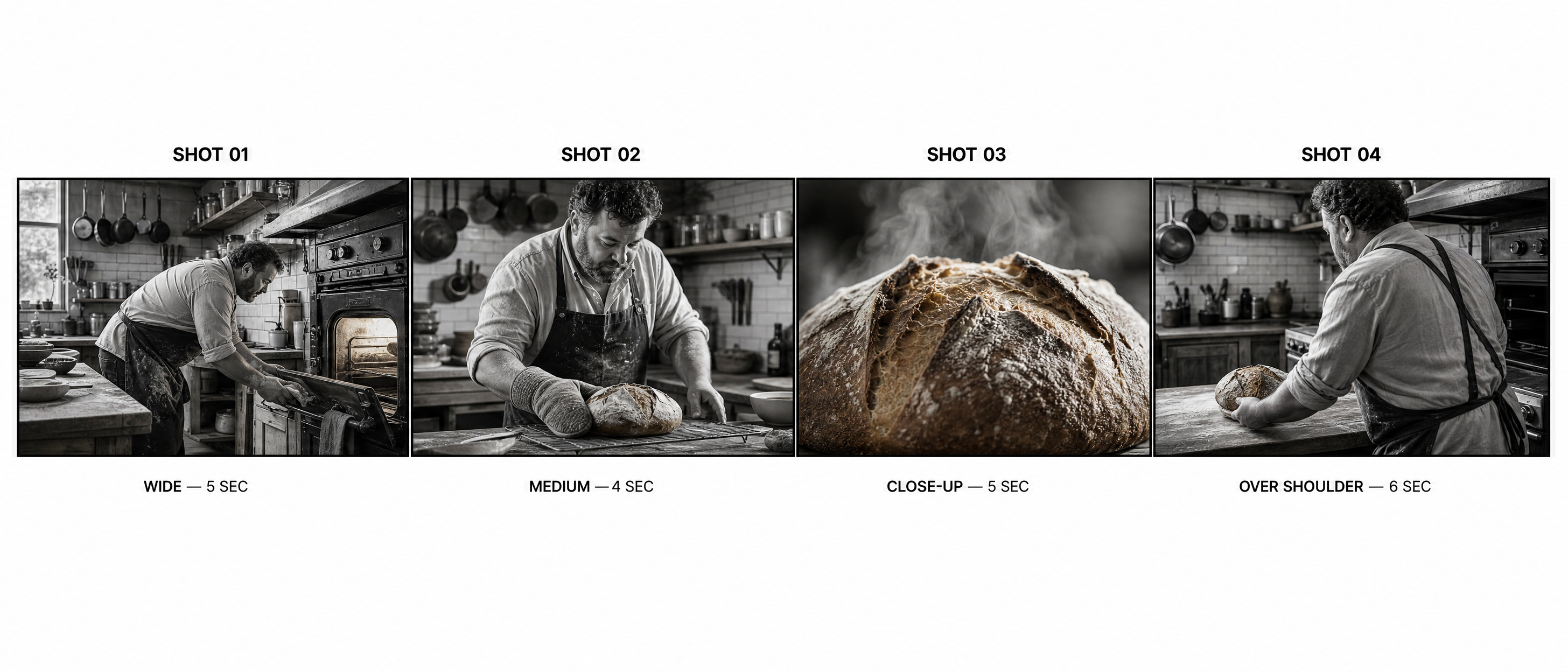
Start by building a concrete plan with a shot continuity sheet. A simple table tracking each shot's duration, location, subject, action, camera angle and reference image means that you won't lose track of things partway through a production of 60-plus shots. A shot continuity sheet can be a small, unglamorous document, but it makes the difference between a production that stays coherent at shot 70 and a production that slowly starts drifting and loses the thread. A shot sheet can look like this:
| Shot | Duration | Location | Subject | Action | Camera |
|---|---|---|---|---|---|
| 01 | 5 sec | Kitchen | Baker | Opens the oven | Wide |
| 02 | 4 sec | Kitchen | Baker | Checks the bread | Medium |
| 03 | 5 sec | Kitchen | Bread | Golden crust close-up | Close-up |
| 04 | 6 sec | Counter | Baker | Sets the loaf down | Over shoulder |
The master document
Before generating anything, lock down four things in one master document:
- Characters: exact appearance, clothing, hair, age and any distinguishing features.
- Locations: architecture, furniture, colors, time of day, weather and lighting.
- Visual style: lens choice, depth of field, color treatment, camera movement and whether it's realistic versus stylized.
- Shot continuity: what happened immediately before each shot, what happens in it and where a character should be facing at the end.
In another piece about shot-to-shot consistency, we discuss using reference images for continuity. This document is just the longer-form version of those, formalized into a single document used to check a whole production. Don't try to hold all these ideas in your head, because the vision ultimately won't come through.
Failure modes specific to long-form video
Beyond the shot-level problems already covered elsewhere, there are a few issues that show up specifically at longer runtimes.
| Problem | What happens | Fix |
|---|---|---|
| AI filler shots | The model invents generic bridging footage between scenes | Plan every shot with a specific purpose rather than leaving gaps for AI to fill on its own |
| Quality variation | Some individual generations render with noticeably better motion or detail than others | Regenerate the weaker shots rather than accepting the first result for every one |
| Clips pushed too long | Reliability drops as a single generation is asked to sustain complicated action for longer | Keep individual generations short and simple, and build length through sequencing instead |
| Editing reveals flaws | A flaw that was invisible in a 2-second clip becomes obvious once it's shown on screen for 8 seconds | Review each shot at its actual edited duration, not just in isolation, before finalizing the cut |
Managing cost and pacing
Not every second of a long video needs the same production value. A quieter connective moment, a slow pan across a still image or a beat between two more dynamic scenes doesn't need a full AI generation the same way an establishing shot or a key action beat does. To keep both the cost and pacing of a long video under control, reserve full AI generation for the moments that really need motion, and use simpler techniques like a pan or a subtle zoom on a still image when motion is less vital.
This technique also tends to produce a better-paced video, not just a cheaper one. It can be exhausting to watch a long-form piece where every single shot is generated at the same intensity. Varying the treatment by using full motion where it makes a difference and something slower in between gives a long video a much better rhythm, similar to a well-edited film rather than a wall of busy, frantic shots.
Building long-form video with AI
Runway Agent can generate and sequence a long-form video shot by shot. It can work from a script or outline the same way it does for a short multi-shot sequence, just repeated across many more scenes. Long-form video can also be generated through the Multi-Shot Video app, built for sequencing several connected shots from one prompt at a time, which is useful for generating a scene's worth of shots at once before moving to the next scene in the outline. The same AI video generator that handles a single transformation or a short sequence easily scales to a full production with one planned shot at a time, rather than one impossibly long single generation.
Understanding how AI video generation works at the model level, and building out a proper AI shot list or AI storyboard before generating, are important first steps if you're planning to jump into an entire long-form production rather than a single scene.
Frequently asked questions
How long does a video need to be to count as "long-form"?
There's no strict cutoff, but most long-form AI video generators build content targeting 10 minutes or more. These are often documentaries, educational series, explainers and narrative pieces that are long enough to need real structure.
Can AI generate an entire long video in one pass?
No, not with current models. Every long-form AI video today is built from many shorter individual generations, planned and sequenced together, rather than one continuous multi-minute generation. That's the case across every tool in this space, not just Runway.
What's the difference between a long-form AI video and a multi-shot AI video?
A multi-shot AI video is a short sequence, usually a handful of connected shots forming one brief piece. A long-form AI video uses the same underlying technique of creating sequenced shots, but at a much larger scale. Long-form videos have dozens or even a hundred or more shots planned and sequenced into a full-length video with its own narrative or informational structure.
Related resources: Multi-shot AI video generator | How does AI video generation work? | AI shot list | AI storyboard