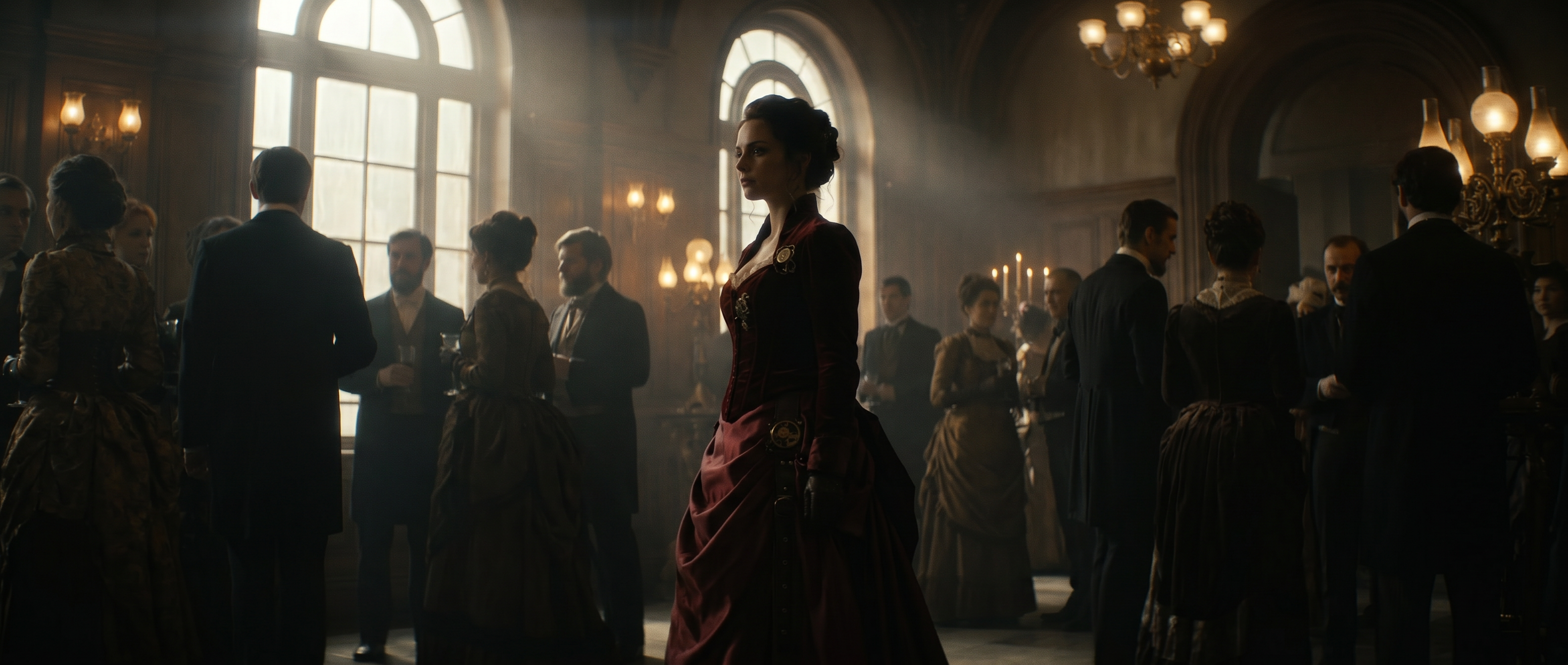
A slow drone move over a desert city at golden hour usually means permits and a crew. Today’s AI video models generate that kind of shot from a text description, a still image or existing footage. This guide covers which models produce cinematic video and what each one is built for, how to prompt for a cinematic look, how filmmakers use generative video at each stage of production and where the models still fall short. Each term is defined as it comes up, so no AI experience is needed.
Can AI generate cinematic video footage?
Yes. Current AI video models generate cinematic shots from a text description, a still image or existing video. You direct how each shot is lit and how the camera moves, while a filmmaker still shapes those shots into a story.
The clearest proof is on a theater screen. Film festivals dedicated to AI-made work now screen their finalists in theaters. Runway’s AI Festival showed its 10 winning films in New York and Los Angeles in June 2026, led by Robert Gaudette’s A Face Only A Mother Could Love, which took the Grand Prix. Its 2025 finalists played in 10 IMAX theaters across the US after the jury selected them from 6,000 submissions.
Audiences respond to the footage as film, not as a demo. In April 2026, Runway posted a spec ad for a fictional watch brand made with AI. It passed 100 million views on Instagram in 48 hours, as reported in the Project Luxo post, and viewers mostly discussed the story
Which AI models produce cinematic video?
Several models now produce footage that reads as cinematic, and they differ in shot length, reference control and how much of the sequence they hold together. This list follows the model guides and documentation as of October 2026, not a leaderboard, since rankings change faster than the models do.
| Model | Developer | Shot length | What it is built for |
|---|---|---|---|
| Seedance 2.5 | ByteDance | Up to 30 seconds | Long, multi-shot sequences with complex camera moves, up to 50 references and audio generated in the same pass |
| Kling 4.0 | Kuaishou | 3–30 seconds | Long takes steered by up to 10 keyframes and up to 15 references, with stereo audio and video editing |
| Gemini Omni Flash | 3–10 seconds | Short shots from text, a first frame or reference images, plus text-prompted edits to existing footage | |
| Veo 3.1 | 4–8 seconds | Short, high-fidelity shots with synchronized dialogue, sound effects and ambient audio | |
| Seedance 2.0 | ByteDance | Up to 15 seconds | Short cinematic work with direct control over lighting, camera movement and performance |
| MiniMax H3 | MiniMax | 5–15 seconds | Multimodal video from text, image, video and audio references |
| Runway Gen-4.5 | Runway | 2–10 seconds | Camera-directed image to video with references for consistent characters and scenes |
Shot lengths and features as of October 2026. Model lineups change often.
Seedance 2.5
Seedance 2.5 is ByteDance’s model for cinematic, long-form, multi-shot work. It generates up to 30 seconds with audio in the same pass, handles compound camera movement within a single beat and holds a character’s appearance across beats once you set their fixed traits early and repeat them. It accepts text, images, video and audio together, up to 50 reference assets in one request, and it can edit and extend a clip as well as generate one. Structure matters at this length, so a prompt needs an asset list, a one-sentence summary and a timeline.
Gemini Omni Flash
Gemini Omni Flash is Google’s video model. In Runway it generates 3–10 second shots at 720p from a text prompt, an optional first frame and reference images, and it edits existing footage from a text prompt, such as adding fire to a character’s hands or changing an outfit. Its edit mode makes it useful for changing a shot you already have without regenerating it.
Seedance 2.0
Seedance 2.0 suits short cinematic work of up to 15 seconds across one or several shots. Lighting, shadow, camera movement and performance respond to specific direction, and motion tends to hold steady instead of warping partway through a shot. It also comes in Fast and Mini variants for quick iteration.
Kling 4.0
Kling 4.0, from Kuaishou, launched in October 2026 and doubles the length of Kling 3.0 to 30 seconds in a single generation. It takes up to 10 keyframes to steer the action along a timeline and up to 15 references across images, video clips and subjects. It outputs up to 4K with stereo sound and can edit existing footage. Kling 3.0 remains available for 3–15 second clips with optional audio and multishot prompts, and Runway also offers Kling 3.0 Motion Control, which animates a still image using the motion from a reference video.
Veo 3.1
Veo 3.1, released by Google in October 2025, is a video model for high-fidelity shots with audio and speech generated alongside the picture. It produces 4, 6 or 8 second clips, so it suits single shots and dialogue moments better than long takes. Describe the sound you want in the prompt, since dialogue, effects and ambience are generated together with the video.
Runway Gen-4.5
Runway Gen-4.5, released in December 2025, remains a dependable choice for camera-directed image to video with references for consistent characters and scenes. Newer models now go further on shot length and reference capacity.
What makes footage look cinematic?
“Cinematic” describes footage that looks like it was shot for a film. It comes from specific craft choices, and once you can name them, you can ask a model for them.
- Motivated lighting: Light with a clear source in the scene, like a window or a streetlight
- Composition: Where the subject sits in the frame and what surrounds it
- Camera movement: A deliberate move that guides the eye, such as a slow push-in
- Shallow depth of field: A sharp subject against a soft, blurred background. Depth of field is how much of the image is in focus.
- Color grade: The overall color treatment of the footage, such as warm amber or cool teal
- Consistent world: Characters, props and light that stay the same from shot to shot
A video model reads these choices from your prompt, the written instructions you give it. Text to video means you describe the shot in words and the model generates it. Image to video means you upload a still, such as a photo or concept frame, and the model animates it. Video to video means you upload a clip and the model restyles or edits it while keeping the original motion.
Image to video gives you more control because the model starts from a frame you already approved. Our guide to realistic AI video recommends it any time realism matters, since the composition, lighting and subject are already locked in.
How to get a cinematic look in Runway
A cinematic result comes from clear direction. Think of your prompt as notes for a director of photography, the person in charge of camera and light. The habits below work across the models above.
Write prompts like a shot description
Our guide to realistic AI video breaks a strong prompt into four parts: subject, motion, lighting and physics. Physics means how things behave by weight and material, like fabric swaying or steam rising. It suggests 20–50 words that cover all four.
Swap vague words for visual ones. “Beautiful” tells the model little, while “soft golden light from a low sun on the left” gives it a direction to follow. Here is an example you can adapt:
Fisherman at dawn
Medium close-up of a fisherman mending a net on a wooden dock at dawn. He pulls the twine tight with slow, steady hands. Soft golden light from the low sun on the left, mist rising off the water. Shallow depth of field. Slow push-in.
- Subject: The fisherman, his net and the dock, framed as a medium close-up
- Motion: He pulls the twine tight with slow, steady hands
- Lighting: Soft golden light from the low sun on the left
- Physics: Mist rising off the water
- Camera: Shallow depth of field and a slow push-in
Direct the camera
Named camera moves give a model something to follow. Mood words like “dynamic” name an impression and leave the framing, angle and speed to the model, as explained in our AI camera prompts guide. These four moves are a good starting set:
- A push-in, where the camera moves slowly toward the subject
- A pan, where the camera turns left or right from one spot
- An orbit, where the camera circles around the subject
- A locked-off shot, where the camera does not move at all
Add a speed to every move, and keep it slow. Our realistic video guide notes that fast whips and pans change the frame too much, so details break apart.
For a short scene, try the three-beat structure from the AI camera prompts guide: an establishing wide shot, a push-in, then a reveal. Generate each beat as its own clip and cut them together, or use a long-form model like Seedance 2.5 to generate the whole sequence in one pass.
Keep characters and scenes consistent
Consistency is what makes separate clips feel like one film. A reference image is a picture you upload so the model keeps a person or place the same in every generation. Our character references guide explains how to pick a good one.
- Generate a still image of your character first, then animate it with image to video.
- Reuse the same lighting description in every prompt for the scene.
- Use the last frame of one clip as the starting image for the next.
- Keep each clip short unless the model is built for length, since our realistic video guide notes that details drift more the longer a clip runs.
These habits scale to larger casts. For Obsidian’s Longchamp film, co-founders Wes Walker and Louis Gheysens said the client asked for “five different characters, all made with AI, with complete consistency.”
How do filmmakers use generative video today?
Generative video is footage made by an AI model instead of a camera. Filmmakers use it at every stage of production, and its role changes by stage.
Pre-production: previs and storyboards
Previs, short for previsualization, is a rough version of a scene made before filming to plan the shots. With AI previs for filmmakers, a script or shot list becomes storyboard frames and short motion clips in minutes. No 3D skills are needed.
That makes it a fast way to test composition and tone. Shots that need precise technical planning, like exact lens data around a stunt, still go through traditional previs.
Production: generated shots, effects and B-roll
B-roll is supporting footage that cuts away from the main action, like city streets or landscapes. AI can generate it, along with effects shots that would be costly or unsafe to film.
On House of David, the Amazon series, the team finished the Goliath origin sequence in Episode Six in a couple of weeks. Director Jon Erwin said the scene “would have taken four or five months in a traditional process.”
Solo filmmakers move fast too. The shorts in Project Luxo were each “made by one person in as little as a few hours to a few weeks of work.” The Rogue, a film of nearly 10 minutes by Felipe Orozco, had a production timeline of three weeks.
Post-production: editing and cleanup
Post-production is the work done after the footage exists, such as editing and color. Our guide to AI in post production shows AI handling first-pass work well, like matching color across cameras and removing unwanted objects.
Runway’s Aleph 2.0 lets you describe an edit once and apply it across a whole scene. People still own the pacing and the creative color grade. Finishing hero shots, the key effects moments an audience remembers, also takes a person.
| Pipeline stage | What AI handles | What still needs a person |
|---|---|---|
| Writing and planning | Drafting shot lists and prompts with a language model | The story and the final shot choices |
| Pre-production | Storyboard frames and rough animatics | Technical previs for stunts and exact lens data |
| Production | Generated shots and effects elements, including B-roll | Directing performances and picking the takes that work |
| Post-production | Color matching, object removal, rough cuts and scene-wide edits | Story pacing and finishing hero shots |
Where AI video still falls short
Knowing the limits helps you plan around them. Some are technical, and some are about who owns the final work.
Known limits in today’s models
Gen-4.5 has three documented limitations that are common to AI video generation models, and our realistic video guide adds another:
- Causal reasoning: Cause and effect can slip, such as a door opening before the handle is pressed.
- Object permanence: Objects can vanish or appear, such as a cup that disappears after something passes in front of it.
- Success bias: Actions succeed too often, such as a badly aimed kick that still scores a goal.
- Fast motion, text and long clips: Fast motion and on-screen text break down easily, and details drift as a clip runs longer, according to our realistic video guide.
The fix is an old editing habit. Generate short clips, then cut them together.
Authorship, copyright and awards
Ownership is the other open question. The January 2025 Copyright Office AI report covers US law. It concludes that, given current generally available technology, “prompts alone do not provide sufficient human control to make users of an AI system the authors of the output.”
The report adds that “a film that includes AI-generated special effects or background artwork is copyrightable, even if the AI effects and artwork separately are not.” Human selection, arrangement and changes to the output can be protected, judged case by case. This covers US law only and is not legal advice, so ask a lawyer about your project.
The film industry draws a similar line. Under the Academy’s 98th Oscars rules, released in April 2025, AI tools “neither help nor harm the chances of achieving a nomination.” Voters instead weigh how much a human was at the heart of the creative work.
The Academy has since gone further. Under the new rules for the 99th Oscars, announced May 1, 2026, acting roles must be “demonstrably performed by humans with their consent.” Screenplays must also be “human-authored,” and the Academy reserves the right to investigate the use of generative AI in any submission.
The rules cover films released in 2026 and apply to the 99th ceremony on March 14, 2027. AI stays allowed as a production tool, while acting and writing awards require human performance and authorship.
Frequently asked questions
Which AI video model is best for cinematic footage?
It depends on the shot. Seedance 2.5 and Kling 4.0 suit long, multi-shot takes of up to 30 seconds with many references. Veo 3.1 suits short shots with synchronized dialogue and sound, and Gemini Omni Flash suits short shots and text-prompted edits to existing footage. Seedance 2.0 suits short shots with tight control over light and camera, and Runway Gen-4.5 suits camera-directed image to video with consistent references. Test the same prompt across two or three models before you commit.
Which AI video models are available in Runway?
Runway includes its own models, Gen-4.5 and Aleph 2.0, alongside third-party models such as Seedance 2.5, Seedance 2.0, Kling 4.0, Veo 3.1, Gemini Omni Flash and MiniMax H3. You can generate with each from the same project and use outputs from one model as references for another. Availability varies by plan, and the model list grows often, so check Runway’s pricing page for the current lineup.
Can ChatGPT generate videos?
No. Language models like ChatGPT are most useful for writing scripts, shot lists and the prompts you give a video model. You can also connect the Runway MCP to ChatGPT for video and image creation. Purpose-built video models, such as Seedance 2.5, Gemini Omni Flash and Runway Gen-4.5, generate the footage itself, including camera moves, lighting and motion from a prompt or a still image.
Can AI generate an entire movie?
AI can generate the shots, but a full film still needs a filmmaker to shape the story and cut the shots together. Models make clips of up to 30 seconds with limits on consistency, cause and effect, and fast motion, so a feature-length film depends on a person to match shots, direct performances and set the pacing.
Do I need to film anything?
No, you can start from a text prompt, a still image or footage you already have. Some models restyle or edit existing video, and you can mix generated shots with footage you filmed yourself, which is how many filmmakers use generative video for B-roll, effects shots and previs while keeping live-action performances.
Who owns AI-generated video footage?
In the US, the Copyright Office says prompts alone do not make a user the author of AI output, but human selection, arrangement and changes to the output can be protected, judged case by case. A film that includes AI-generated effects can be copyrightable as a whole. Ask a lawyer about your project, because this covers US law only.
Can AI win an Oscar?
AI tools can be part of how a film is made, and the Academy says they neither help nor harm a nomination. The rules for the 99th Oscars, held March 14, 2027, require acting roles to be demonstrably performed by humans with their consent and screenplays to be human-authored.
Is there a free way to try Runway?
Yes. Runway’s Free plan costs $0 and includes 125 one-time credits and a selection of generative models to test concepts. Paid plans start at $12 a month billed annually and include access to all video and image models. Try Runway free and test a few cinematic shots of your own.
What comes next for AI filmmaking
Each new video model takes on more of the mechanical work. That shifts the value toward taste: knowing what a shot should feel like and when it is right.
The Project Luxo team made the same point. AI does not remove the need for writing, direction, editing or taste, and in many ways it makes those skills matter more.
The bigger change is the cost of trying. When a shot that once needed a crew can be tested in minutes, more ambitious ideas get made instead of shelved.
Runway is researching the limits above as part of its work on world models. These are AI systems that learn how the world behaves, including what follows an action.
Where to start
Write one shot description and generate it. Study what the model got right, then build a three-beat sequence.
Cinematic shots come from specific direction, and a three-beat scene is the quickest way to test yours. Generate an establishing shot, a push-in and a reveal in Runway with Seedance 2.5 or Gen-4.5, then cut them together to judge the scene before you commit a crew. Get started for free.
Related: AI camera prompts · Seedance 2.5 prompt guide · AI previs