Keep context exactly where decisions get made.
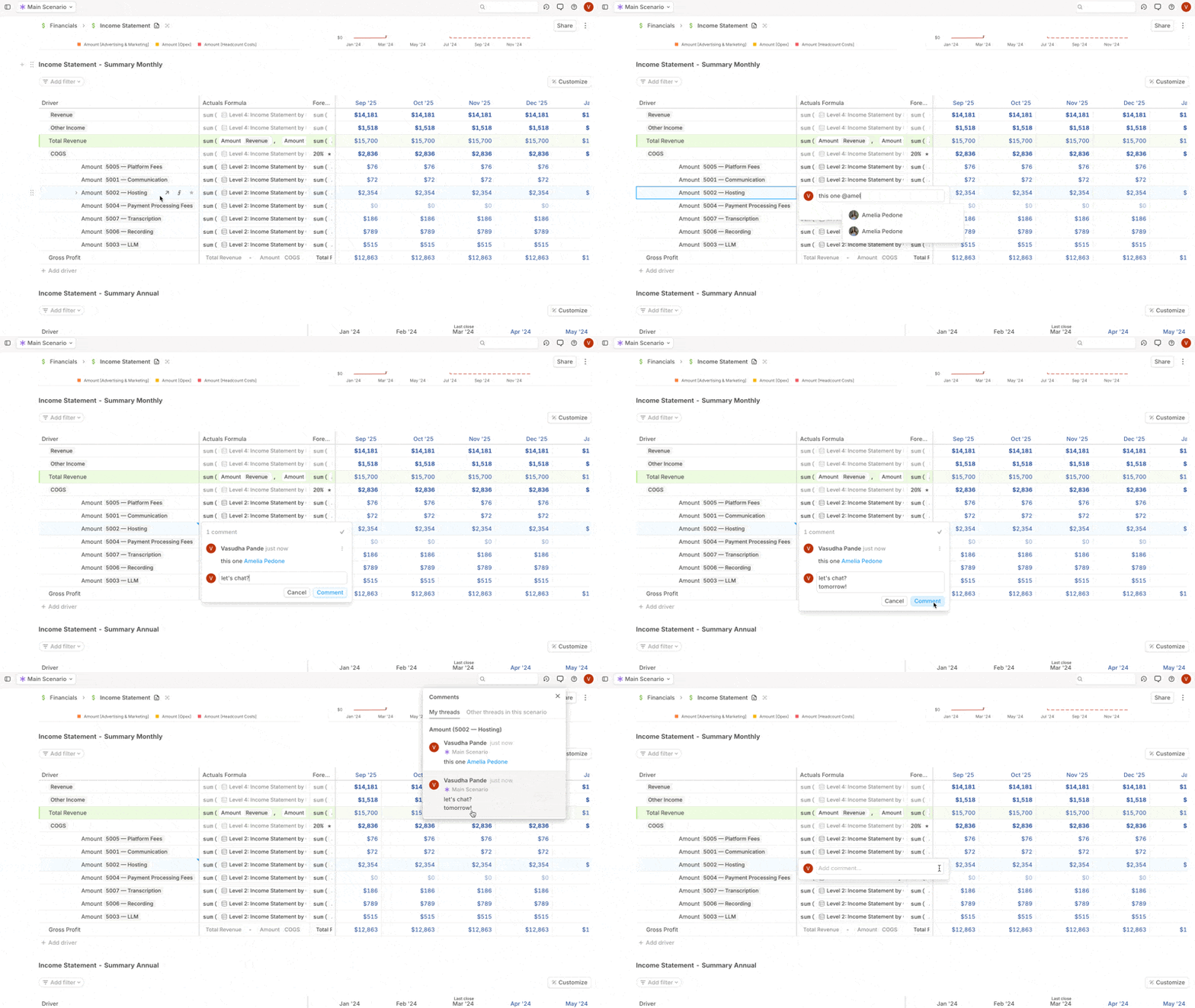
You can now leave comments directly on driver cells, variances, and assumptions.
Need to explain seasonality? Question a revenue spike? Flag a headcount assumption? Leave a comment, tag a teammate, and move on—your thinking is saved.
Built for finance workflows
- Budget vs. Actuals: Add notes right on the variance cells to explain deviations from plan.
- Time period comparisons: Explain why drivers changed between periods..
- Forecasting: Log assumptions as you go, so anyone reviewing the model sees your logic.
- Month-end close: Flag items for review, tag your teammates, and track issue resolution without leaving Runway.
How it works
Right-click any cell in Runway to add a comment.
- Use
@mentions to notify teammates—they’ll get an instant in-app ping. - Comments support rich text formatting, and are timestamped for audit trails.
- Hover to preview, click to expand, and resolve when done.
- Comments persist across scenarios. They're visible in draft scenarios, and they follow your work when merged to Main.
- All open threads appear in the comment menu.
- Comments respect permission levels. Admins can delete any comment.
Available now for all Runway users.